


Face Beauty Makeup Camera-Self
4.6219.00 Reviews
App Specs
- Version
- 18.0.0
- Updated On
- License
- Free
- Downloads
- 5,000,000+
- Developer
- Daily Aims
- Categories
- Beauty
- Platform
- Android, iOS
Screenshots
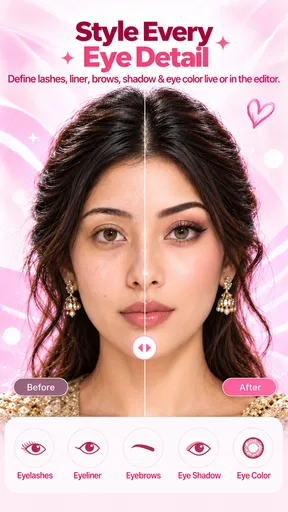
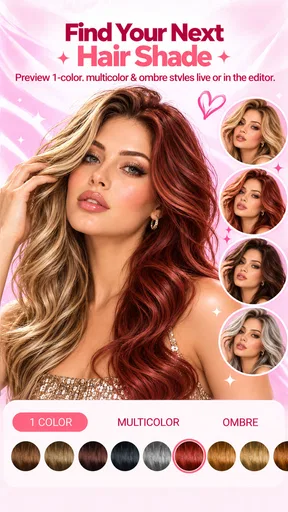
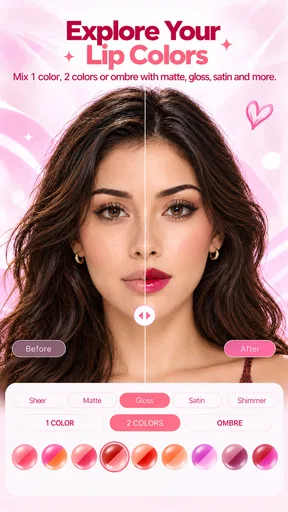
 Analysis by AppCompare
I see Face Beauty Makeup Camera-Self as a playful selfie editor rather than a substitute for learning makeup or carefully retouching portraits. Its appeal is the chance to try a different look quickly, then decide whether it suits the photo before sharing it. I’d recommend it to anyone who enjoys experimenting on casual selfies, with one caveat: the more realistic you want the result to look, the more restrained you’ll need to be with beauty effects.
A quick makeover, with room to experiment
As a beauty app from Daily Aims, Face Beauty is aimed squarely at people who want to enhance selfies without turning a simple edit into a long project. It is free, rated for Everyone, and has an average rating of 4.5 from around 32,000 ratings. More than five million installs suggest it has reached a broad audience, though popularity alone doesn’t tell you whether its editing style will fit your taste.
The first useful distinction is between using the app for fun and using it to prepare a photo you want to keep looking like you. Makeup overlays and skin smoothing can make a selfie feel more polished, but they can also shift the balance of a face if you apply everything at once. I get the best results by treating each edit as a small adjustment: add one effect, inspect the whole image, and only then decide whether another change helps.
That slower approach matters because a selfie is more than a face in isolation. A strong lip shade might work well in a close crop but feel out of place against the lighting or colors in the background. Before settling on a look, I’d check the image at its intended size rather than judging only the zoomed-in preview. It’s a simple habit, but it can keep a fun makeover from becoming an overworked portrait.
Where the editing tools are most useful
The strongest reason to try this app is the low-stakes experimentation. A person who is curious about a bolder eye look, a different lip color, or a hair shade can test an idea on a photo before committing to it in real life. That makes the app useful not only for posting playful edits, but also for narrowing down what kind of look you might want to try with actual makeup or a temporary hair color.
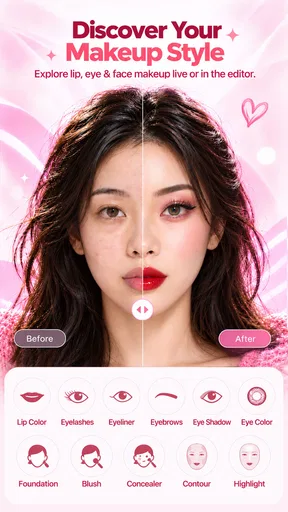
There’s also a practical workflow here: start with a clear, well-lit selfie, apply a single makeup choice, and compare the result with the untouched image. If the lighting is already warm or dim, a color effect may read differently than expected, so it’s worth checking whether the edit is flattering because of the makeup or simply because the photo itself has a favorable tone. I find that comparison more useful than piling on several effects and trying to work backward.
For a quick everyday example, imagine taking a selfie before meeting friends and wanting to see whether a brighter lip would suit the outfit. You can try the look without having to redo your makeup, then save the version that feels right or return to the original if the edit looks too strong. That kind of small decision is where a selfie-focused tool makes sense: it offers a preview, not a promise that the digital result will match a real-world application exactly.
Worth Reading Before You Choose

Flipboard Shows What News Apps Must Do Beyond the Feed

Switching to Android Auto Means Rethinking Your Driving Routine

Google Calendar Makes a Crowded Week Easier to Manage

Ludo King Makes the Most of the Minutes Between Plans

Baby Panda World Brings Quick Play to Modern Phones, but Its Game Library Feels Busy

ESPN’s Live Game View Makes Following Close Games Easier
The app is also a comfortable option for people who don’t want to learn a full photo-editing suite. More advanced editors can offer precise control over individual areas, layers, and color adjustments, but that extra flexibility brings a learning curve. Face Beauty is better suited to someone who wants approachable beauty effects and quick visual changes, rather than a detailed retouching workspace. If you need exact control for a professional portrait, I’d choose a more capable editor instead.
How to keep a selfie looking like you
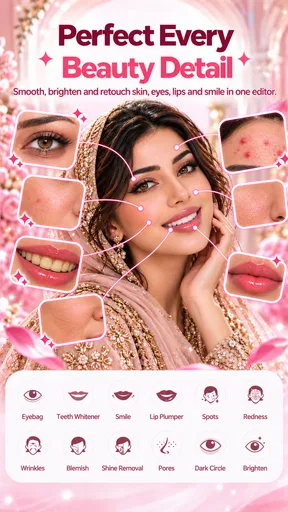
Automatic beautification is convenient, but it’s also the feature I’d approach with the most care. Smoothing can make a portrait look cleaner at first glance, yet too much can remove the texture that helps a face look natural. I’d use the lightest treatment that achieves the effect you want and check familiar details, such as the edges around the face and the overall skin tone, before sharing. The goal should be a polished version of your photo, not a different-looking person.
Makeup effects call for a similar check. A preset is a quick starting point, while customizing a look is better when you already have a particular color or mood in mind. I wouldn’t assume that a dramatic shade that looks fun on screen will suit every photo; contrast, expression, and the crop all affect how it reads. If you’re unsure, save a subtle version alongside a more adventurous one and choose later, rather than committing to the boldest edit immediately.
Hair-color previews are best treated as inspiration, not as a dependable forecast of a real dye result. A photo effect can help you imagine a change, but it doesn’t reproduce how a shade will look under different lighting or on your actual hair. If you’re considering a lasting change, use the preview to explore a general direction, then seek a more realistic consultation or color-testing option before making a decision.
One small but helpful practice is to keep an unedited copy of any photo you care about. That gives you a clean reference if you later want to try another style, and it makes it easier to judge whether the retouching has gone further than you intended. I’d also check the finished image outside the editing screen before posting it, since a result can feel different once viewed at normal size or alongside other photos.
Who should try it—and who may prefer another tool
I think the app fits casual selfie-takers, makeup-curious users, and anyone who likes trying a new visual style without buying products first. It can also be useful for a quick social post when you want a playful change rather than a painstakingly edited portrait. The low-commitment nature is the point: experiment, compare, and keep only the version you actually like.
It’s less suitable if you want subtle, technically precise retouching, need a consistent look across a set of professional images, or prefer photos with no beauty effects at all. In those cases, a manual photo editor or the camera tools already on your device may be a better fit. Likewise, if you’re choosing makeup for an important event, a digital preview can help with ideas, but trying the products in person will tell you more about their real color and finish.
Compared with the usual alternatives in the beauty category, this app’s strength is its focus on quick face-oriented experimentation rather than broad image editing. That narrow focus makes it approachable, but it also means I wouldn’t make it my only photo tool. I’d use it to explore a look, then rely on a more precise editor if I needed careful adjustments to the entire image or wanted detailed control over a particular area.
If you’re deciding whether to install it, the practical question is what you want to do with your selfies. For casual transformations and makeup ideas, the free price makes it easy to try without treating the download as a major commitment. If you mainly want to preserve an untouched, natural image, you may find the effects unnecessary and prefer your regular camera app instead.
The app is rated for Everyone, so its stated age suitability is broad. That doesn’t mean every user will enjoy the same editing style: younger users may treat the effects as dress-up, while adults may use them for social photos or experimenting with possible looks. In either case, I’d keep the edits playful and avoid treating a smoothed preview as a standard for how anyone should look.
Getting Started with Glam
First things first, downloading this beauty wizard is a breeze. Pop into your app store, grab a coffee, and it'll be ready to transform your selfies in no time. Once you've got it installed, opening the app feels like entering a virtual beauty salon. The interface is super intuitive, which is a huge plus if you're like me and prefer to dive right in without a tutorial.
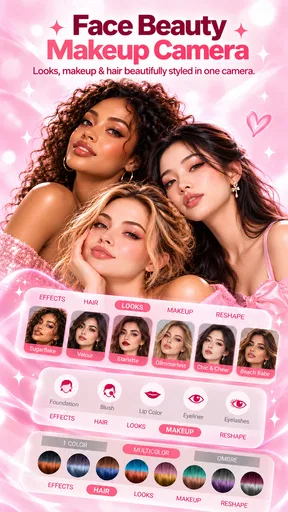
The app gives you an array of features to play with. From foundation to blush, and even some killer eyeliner styles, Face Beauty Makeup Camera-Self has it all. For a photo-editing app, it’s surprisingly robust. It’s like having a makeup artist on speed dial — no appointment needed!
Features That Make You Go Wow
Let’s talk features. One of my favorites is the automatic beautification tool. Just a tap and boom — your skin looks flawless. It smooths out imperfections like a charm but still keeps things looking natural. No one wants to look like a cartoon version of themselves, right?
Next up, the makeup feature. This is where the magic happens. You can choose from pre-set looks or customize your own. I love experimenting with bold lip colors and dramatic eye shadow, things I wouldn't normally try in real life. And hey, if it doesn't work out, a quick swipe and it's gone. No makeup wipes needed!
And don’t even get me started on the hair color options. Feeling like a redhead today? Go for it! Want to try some pastel shades? Why not? It's all about having fun and expressing yourself.
The Social Sharing Edge
Once you’ve created your masterpiece, sharing it is as easy as pie. The app links seamlessly with all your favorite social media platforms. I’ve had a blast posting my new looks on Instagram and getting feedback from my friends. It’s like a mini-confidence boost every time someone comments on how great your virtual makeover turned out.
But here’s a tip: while the app does a fantastic job, always double-check how the edits look outside the app before posting. Sometimes the filters can be a bit generous, and it’s good to know what your audience will see.
Final Thoughts
After spending some quality time with Face Beauty Makeup Camera-Self, I can honestly say it’s a must-have for anyone who loves experimenting with makeup and enhancing their selfies. It’s user-friendly, packed with features, and gives you the freedom to express yourself creatively. Plus, it’s just plain fun.
So, if you're looking to spice up your selfie game, give this app a whirl. Who knows, you might just discover your next favorite look!
Ready to transform your photos? Head over to your app store and start your beauty journey today. You won’t regret it!
Pros
- User-friendly interface for quick edits.
- Wide variety of filters and effects.
- Real-time preview of changes.
- Customizable editing tools for precision.
- Lightweight app with smooth performance.
Cons
- Contains in-app purchases for premium features.
- Advertisements can be intrusive.
- Limited free features compared to competitors.
- Some edits may not appear natural.
- Requires camera permissions to function.
FAQs for Face Beauty Makeup Camera-Self
What features does Face Beauty Makeup Camera-Self offer?
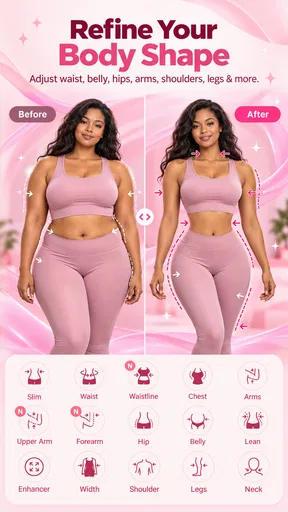
Face Beauty Makeup Camera-Self offers a variety of features designed to enhance your selfies. These include real-time makeup effects, skin smoothing tools, various filters, and the ability to adjust facial features like eyes, lips, and nose. It also includes options for virtual accessories and hairstyles to complete your look.
Is Face Beauty Makeup Camera-Self free to use?
The app is available for free download with basic features accessible to all users. However, it offers in-app purchases and a subscription model to unlock premium features such as advanced filters, exclusive makeup styles, and an ad-free experience. This allows users to enhance their experience based on their preferences.
Does Face Beauty Makeup Camera-Self require an internet connection?
While the basic features of Face Beauty Makeup Camera-Self can be used offline, an internet connection is required to access certain features like downloading new filters and makeup styles, as well as for regular updates and in-app purchases. This ensures users have access to the latest tools and enhancements.
Can Face Beauty Makeup Camera-Self edit photos from my gallery?
Yes, Face Beauty Makeup Camera-Self allows you to import photos from your gallery for editing. You can apply makeup effects, filters, and other enhancements to any photo saved on your device, not just the ones taken using the app's camera. This adds flexibility and convenience for users.
Is Face Beauty Makeup Camera-Self suitable for all ages?
While Face Beauty Makeup Camera-Self is user-friendly and suitable for a wide range of ages, it is primarily designed for teens and adults interested in enhancing their selfies. Parents should review the app's features and in-app purchase options to ensure it aligns with their preferences for younger users.


